Free QR Code Generators Compared: Which Ones Still Work After You Print Them
A free QR code can become expensive after it is printed. The design is approved, the menus or flyers are produced, and only then does someone discover that the code points to an expired trial page.
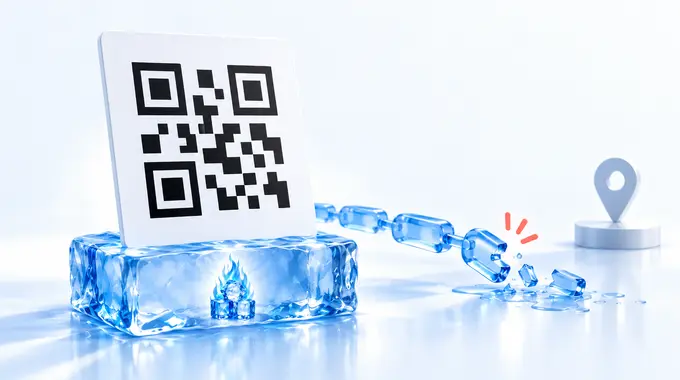
The important choice is static versus dynamic. A static code contains the destination itself. A dynamic code normally contains a provider's short link, which forwards the visitor elsewhere.
Think of a static code as printing the address. A dynamic code prints the address of a forwarding desk. The desk can redirect visitors and count them, but somebody must keep it operating. This comparison looks at six practical options. I built the first tool in the table, so that relationship is disclosed; it is not automatically the winner.
QR Code Generator
The Built by meQR Code Generator is the focused static option for people who want more than a web link without opening an account.
Built by Nikita. No affiliate link or referral tracking.
It creates codes for URLs, Wi-Fi details, vCards, email, phone, SMS, and plain text — the widest payload range in this comparison. Generation happens in the browser. There is no upload, account, or quota, so the finished code does not depend on an n-g.be redirect staying online.
PNG and SVG downloads are both available, so it also covers the vector-print case without a separate tool. That is useful for office Wi-Fi cards, contact details, printed instructions, and stable links. The payload cannot be edited after printing. That is a property of the static approach, not a missing subscription tier.
The trade-off is management. There is no provider dashboard, scan history, or remote destination change. You must control the destination and create a new code if the payload changes.
Use it when you want a direct static code with several payload types, vector export, and no account.
QRCode Monkey
QRCode Monkey is the strongest option here for a designer who wants a static code in a print-friendly format.
Independent link. No affiliate relationship, no referral tracking.
The service says its codes are static, have no generator-imposed scan limit, and do not expire. It offers PNG and SVG downloads, plus PDF and EPS with some design limitations. SVG is the useful detail for large-format work because it scales without becoming pixelated.
QRCode Monkey also provides extensive styling and logo controls. Those controls increase the need for testing. A code can be valid and still scan badly when colours, logos, or surrounding artwork reduce clarity.
This is not a local-only tool. Its FAQ says QR image files are cached on its server for 24 hours. That does not change the static result, but it matters when local processing is a selection criterion.
Use QRCode Monkey when you need a free static code, vector output, and more visual control. Keep the design conservative enough to survive the actual print surface.
Adobe Express
Adobe Express fits when the QR code is one element inside a flyer, menu, card, or poster you are already designing.
Independent link. No affiliate relationship, no referral tracking.
Adobe says its generator creates static URL codes that do not expire. It offers PNG, JPEG, and PDF downloads, and the code can move directly into an Adobe Express design.
The limitation is scope. Adobe currently documents URL generation, not direct Wi-Fi or vCard payloads. It also lacks the editable destination and service-side scan analytics of a dynamic platform.
The phrase 'does not expire' needs care. Adobe is saying the generator does not switch off the static pattern. The page or domain inside that pattern can still move, fail, or expire.
Use Adobe Express when the destination is a stable URL and the next job is layout, not QR management. The sign-in flow can vary, so verify your route before relying on it for an urgent production task.
Canva
Canva is the best fit when the artwork already lives there and several people need to edit the design.
Independent link. No affiliate relationship, no referral tracking.
Its static QR app is free with any Canva plan. The destination is fixed, there is no scan tracking, and updating the link requires a new code and a reprint. That is the lower-dependency choice.
Canva also offers a separate dynamic option. That version can provide editable destinations, customisation, and plan-dependent analytics. The interface therefore contains the most important decision in this article: static or dynamic.
Do not choose dynamic just because it appears more capable. Choose it only when changing the destination after print or collecting service-side scan data is worth the account and provider dependency.
Use Canva static for stable links inside Canva layouts. Use its dynamic option only after checking the current plan, ownership, and continuity conditions for the whole print run.
Google Chrome
Chrome is the fastest option when the page is already open and you simply need a downloadable QR code for it.
Independent link. No affiliate relationship, no referral tracking.
Google documents the workflow inside Chrome's sharing menu: create the QR code, download it, or scan it from another device. There is no separate generator to learn.
That speed is also the limitation. Chrome is a page-sharing feature, not a campaign manager or print-production tool. Google does not document built-in tracking, destination editing, alternative payloads, or vector print exports in this workflow.
Chrome works well for a quick sign, internal handout, or one-off page link. It is a poor choice when the designer needs brand controls, vector files, or a managed set of codes.
Use it when speed matters more than options. Scan the downloaded file before placing it because the absence of a setup screen does not remove the need for a proof.
QRCG by Bitly
QRCG by Bitly is the strongest managed option in this comparison. It is also the clearest example of why 'free QR code' needs a second question.
Independent link. No affiliate relationship, no referral tracking.
Its dynamic codes use short URLs, so the destination can be changed and scans can be measured. The documented statistics include scans over time, operating system, country or city, and unique scans. Those features can justify a managed service for campaigns.
The free dynamic offer is a 14-day trial. QRCG by Bitly says dynamic codes created during that trial are deactivated when it ends and send scanners to a service page. A printed trial code needs a paid plan to stay active.
The service also creates static codes. Its support documentation says those static codes continue working after the trial because they encode the entered data directly. Static codes do not collect the service's scan statistics.
Use QRCG by Bitly when editable destinations and a scan dashboard have real operational value. Before printing a dynamic code, record the organisational owner, billing owner, renewal date, and fallback destination.
Recommendation
Personal Recommendation
For a long-lived menu, sign, or product insert, start with a static code pointing to a URL your organisation controls. That removes the generator's redirect from the chain. It does not make the destination immortal.
For a campaign where the landing page may change, a dynamic code can be the better business choice. The ability to correct a destination after print may be worth far more than the subscription. Treat it as managed infrastructure, not as a downloaded image.
Before approving print, decode the exact exported asset and inspect the domain. Preserve a clear quiet zone around the pattern. Use strong contrast, and print the code as large as the layout reasonably allows.
Then test a physical proof at the final size, on comparable material, with several phones and realistic lighting. Error correction can help with dirt or small damage. It cannot renew a subscription or restore a dead landing page.
My practical recommendation: use the Built by meQR Code Generator for direct multi-purpose static codes without an account. Choose QRCode Monkey for vector output, Adobe Express or Canva static when the code belongs inside a design workflow, and Chrome for the quickest one-page handoff.
Choose QRCG by Bitly when edits and scan analytics justify a managed dynamic code. It ranks lower for independence but higher for campaign control. For more practical tool choices, browse Tools & Guides. The right winner depends on which risk costs more: reprinting the code or maintaining the redirect.