
Free Word Counters Compared: 6 Tools and What They Actually Count
Two word counters can disagree without either being broken. A paste-in counter sees plain text, an editor sees a document, and a browser extension sees only the selection you made.
That makes word count a rules question rather than a maths question. It is like taking a headcount at an event: the answer changes when the inclusion rule changes.
This comparison looks at six free counting options by scope, metrics shown, keyword-density access, account friction, and workflow fit. One of them is mine, it is listed first, and it ties at the top rather than winning — the reasoning is in its section below.
Word Counter & Character Counter
I built this one, so the bias is declared before anything else. It is first in the table because it is mine and that is disclosed — not because it beat WordCounter.net. The two are level at 4 / 5, and if you want the deepest set of writing statistics, the next section is the honest answer, not this one.
My own tool. I built it, so this is not an independent recommendation.
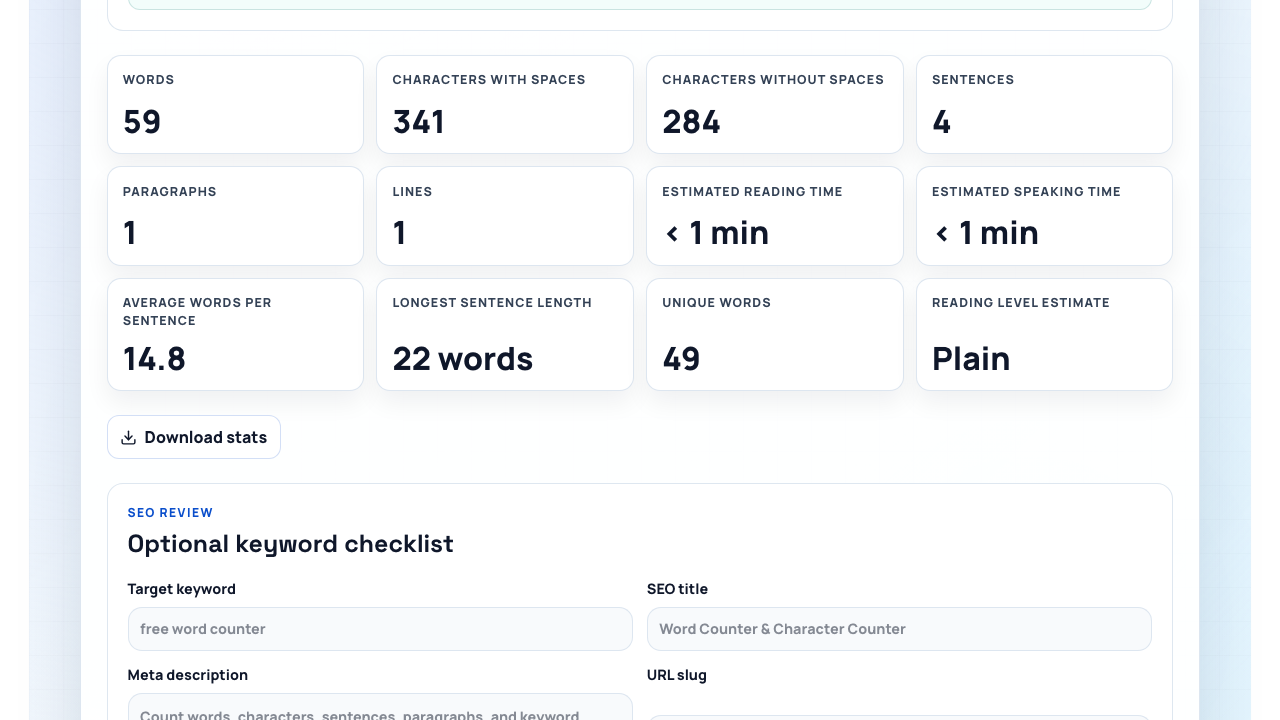
Paste text and it reports twelve figures at once: words, characters with and without spaces, sentences, paragraphs, lines, estimated reading and speaking time, average words per sentence, longest sentence length, unique words, and a reading-level estimate. A Download stats button saves the lot as a plain text report.
Two of those twelve are assumptions rather than measurements, and the tool says so: reading time uses a default of 200 words per minute and speaking time 130 words per minute. Every counter in this comparison that offers a reading time is doing the same thing — dividing by a pace nobody in your audience agreed to. Treat it as a planning figure, never as an observation.
The part no other tool in this comparison offers is the SEO panel underneath. It checks one target keyword or phrase, then reviews the length and keyword placement of a title, meta description, and URL slug against fixed ranges — 40 to 60 characters for the title, 120 to 160 for the meta description. That is a copy checklist, not a counter, and it is the actual reason to choose it over a bigger dashboard.
The page states that analysis happens in the browser and that text is not stored, uploaded, or sent to a server. It works without an account, payment, or a displayed quota. That is a product disclosure, not a security guarantee — treat it the way you would treat any vendor's own statement.
Its keyword density is deliberately framed as a rough check. A percentage can reveal a missing or repeated phrase, but it cannot decide whether the writing is useful. If you want the longer argument about why density is a weak signal in the first place, SEO, AEO and GEO covers it, and Generate Keyword Ideas With AI covers choosing the target phrase before you measure it.
The weakness is shared by every paste-in counter: it sees what you paste, not the source document's structure. Use it for copy, web fields, reading-time estimates, or a quick SEO checklist. Use an editor when the file itself is the deliverable.
WordCounter.net
WordCounter.net is the busiest writing workspace in this comparison, and the one with the most statistics.
Independent link. No affiliate relationship, no referral tracking.
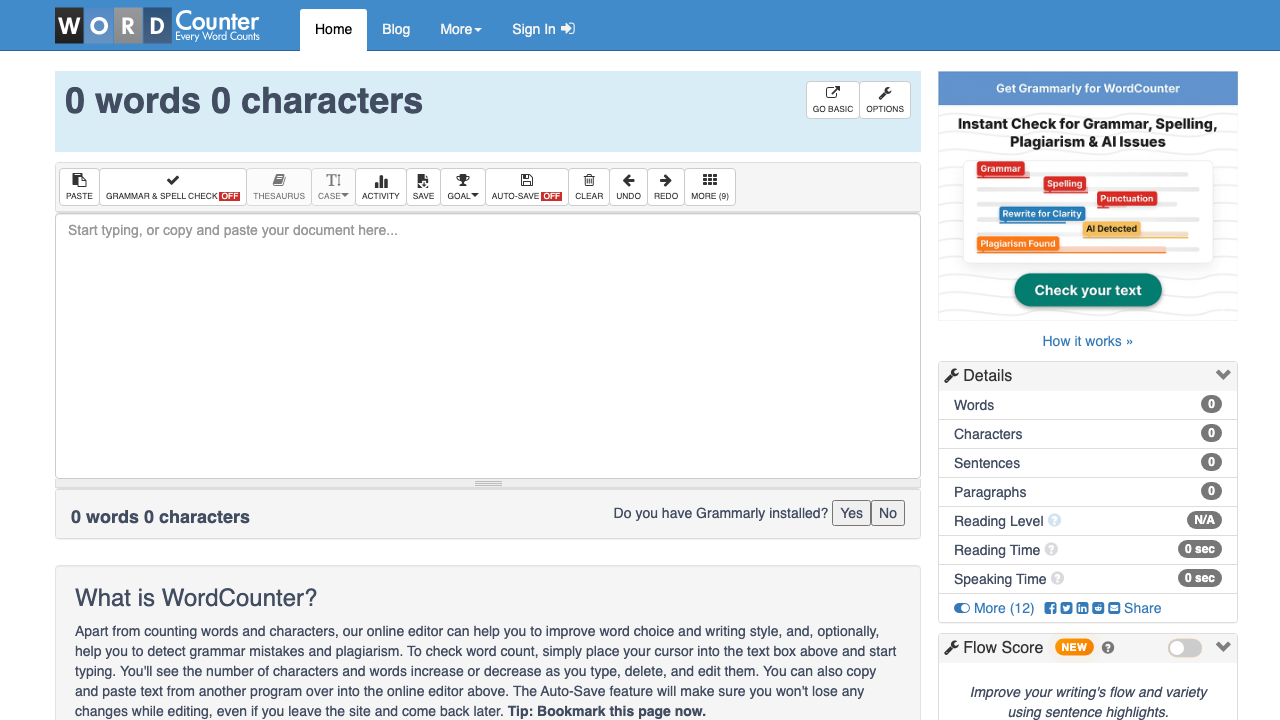
The headline covers words and characters. Its details panel shows seven figures in view — words, characters, sentences, paragraphs, reading level, reading time, speaking time — with twelve more behind a More toggle. Nothing else here comes close on breadth.
It also exposes keyword density for one-, two-, and three-word sequences, which is a genuinely better density feature than a single-phrase check. Core counting and density are available on the public page without creating an account.
Signing in is presented for extras such as automatic saving, stored versions, and writing goals. That makes the tool useful when counting is part of a longer editing session rather than a one-off check.
The trade-off is interface weight, and the screenshot above makes the case better than a sentence can: a toolbar, a details sidebar, a Grammarly promotion, a consent dialog, and a flow score, around one number. Someone who needs one figure has to find it first.
Use WordCounter.net when you want a writing dashboard around the count, and when three-word density matters. Choose a quieter counter when you need one fast measurement.
Google Docs
Google Docs is the sensible choice when the document already lives in Google Docs.

Independent link. No affiliate relationship, no referral tracking.
Its word-count panel shows four figures: pages, words, characters, and characters without spaces. It can display the word total while you type, and count a selected passage separately from the whole file.
The important difference is scope, and it is documented rather than folklore. Google's own help page says that unless you select part of the document, the count applies to everything except headers, footers, and footnotes. A plain-text counter cannot reproduce that rule unless you strip those areas out first.
This is why an apparently smaller total can still be the operationally correct one. If a colleague works in Docs, the Docs figure is the one everyone can reproduce in the same file — and reproducibility is what a word limit actually asks for.
Docs does not expose keyword density in its standard word-count panel. You need a separate tool or an add-on for repetition analysis.
Use Google Docs for a document-native total and collaboration. Use a dedicated counter when you need density, reading time, or SEO-field checks.
Microsoft Word
Microsoft Word plays the same source-of-truth role for Word documents.

Independent link. No affiliate relationship, no referral tracking.
Its word count updates while you type in the status bar. The detailed view adds pages, characters, paragraphs, and lines, and a selected passage is counted alongside the full document rather than instead of it.
That makes Word the best operational fit when a .docx file is the deliverable. Copying the body into a web counter can change whitespace or drop document elements, and then you are measuring a copy rather than the thing you are handing over.
Word's strength is document context, not keyword analysis. Its count is built into the editor, but it does not replace a density tool or a focused web-copy checklist.
The weakness is overhead for small snippets. Opening or creating a document is unnecessary when you only need to check a meta description, a caption, or one paragraph from another system.
Use Word when the file itself is the source of truth. Use a paste-in counter for small independent pieces of copy.
Character Count Online
Character Count Online is the compact middle ground, and the only tool here that leads with characters instead of words.
Independent link. No affiliate relationship, no referral tracking.
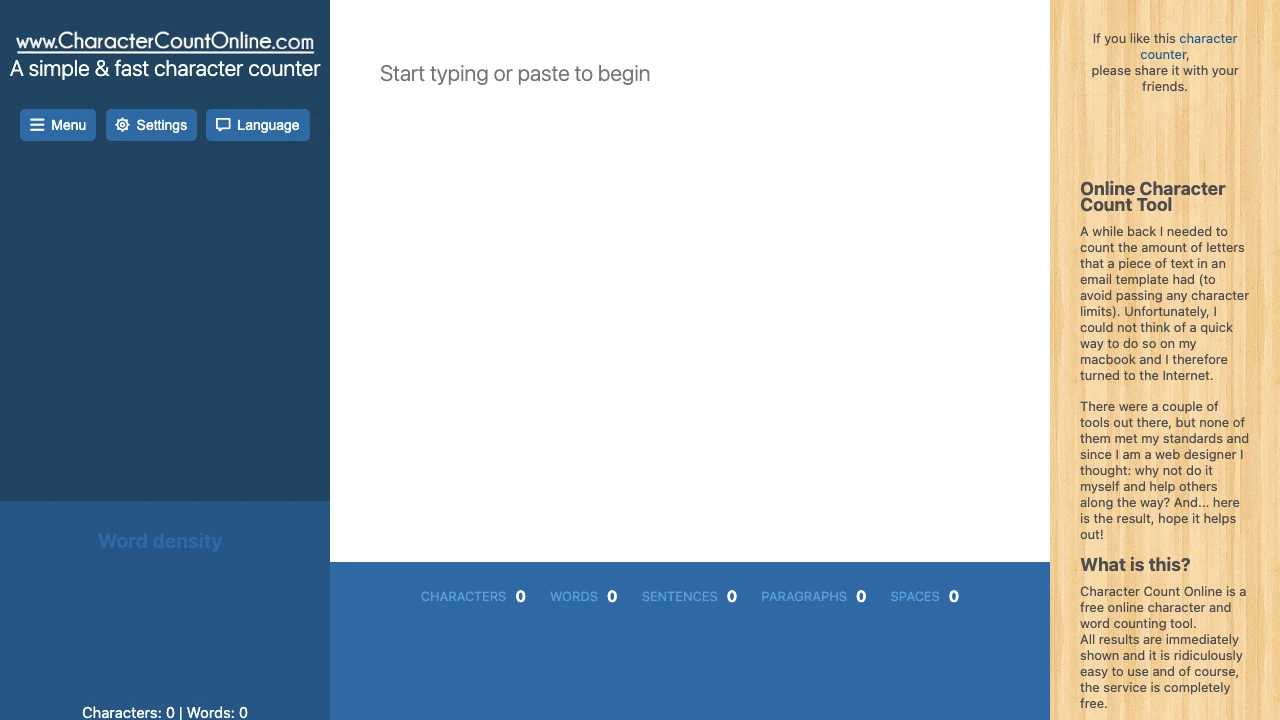
It reports five figures along the bottom of the editor: characters, words, sentences, paragraphs, and spaces. A configurable word-density panel sits on the left and makes repeated terms visible without an account.
That ordering is the point. It is practical when character length is the first concern — email subject fields, snippets, adverts, form labels, or any interface with a hard character limit where the word count is irrelevant.
Its density controls include stop-word handling, which is worth knowing about for a reason beyond this tool: two density panels can disagree simply because they exclude different common words. If two tools give you different percentages, check the stop-word setting before assuming one is wrong.
The trade-off is depth. It does not try to become a document editor, and it exposes fewer workflow statistics than the larger paste-in options.
Use it for a quick character-first check with basic word density. Look elsewhere for document structure, writing goals, or a guided SEO-field review.
Word Counter Plus
Word Counter Plus is the selection-first option, and the only one here that never asks you to move the text anywhere.
Independent link. No affiliate relationship, no referral tracking.
Highlight text on a webpage, then use the context menu or the keyboard shortcut. The extension counts the highlighted passage in place, without opening a separate counter page.
That is a real workflow advantage for research, content reviews, support tickets, and published pages. The count follows the selection, so there is no paste step and no chance of pasting the wrong half.
It is also the one entry in this comparison I could not screenshot: the Chrome Web Store listing sits behind Google's consent screen from Belgium, and accepting cookies to photograph a listing is not a decision worth making for an article. Everything above describes how a selection counter works, not what the listing promises. Read the listing yourself before installing it, in particular the permissions and the data-collection disclosure — that advice applies to every browser extension, not only this one.
The limitation is structural and unavoidable: it counts the selected text. Miss a paragraph, a caption, a collapsed section, or a dynamically loaded block and the total is quietly incomplete. There is no density feature.
Use it when the job is 'count this visible passage'. Never use a selection counter as a substitute for a whole document's official count.
Audit the rule before the count matters
When two totals differ, test the rule instead of debating the number. One small sample does it, as long as it contains the cases most likely to expose a difference.
Include a contraction such as can't, a hyphenated term such as state-of-the-art, a number such as 2026, a punctuation-only item such as ..., and the same keyword twice on separate lines. Five lines is enough.
Paste exactly that sample into each compatible tool. In Docs and Word, also test whether a header or a footnote enters the normal total. With the extension, select the same visible characters twice and check you get the same answer.
The goal is not to crown a universal winner. It is to learn the rule that governs the job in front of you — and that rule usually belongs to whoever receives the file, not to whoever writes it.
Once a formal limit matters, stay with one counter and tell collaborators which one you used. The same discipline applies to any measured content workflow; Internal Links Under Control is the longer version of that argument for a whole site.
Recommendation
Personal Recommendation
Use Google Docs or Microsoft Word when that editor holds the source document and another person has to reproduce the total. The editor's rule is the one that will be applied to you.
For plain text with no account: Built by meWord Counter & Character Counter if you also want the SEO-field checklist, WordCounter.net if you want the deepest statistics and three-word density, Character Count Online if characters come first, and Word Counter Plus when the text is already on a page in front of you.
The best counter is not the one with the largest feature list. It is the one whose inclusion rule matches the work you are handing over — which is why two of the six here scored the same, and why the tie is more useful than a winner.
For the same treatment of a different job, 7 Alternatives to WordHTML.com compares the tools that turn formatted text into paste-ready HTML.